How Can I Use the Dew Point Calculator?

Start

Start by moving the sliders for Temperature, Relative Humidity (RH) and Dew Point to define an environment.

Step 1 - Interaction of T, RH, and DP

Every environment has exactly one combination of temperature (T), relative humidity (RH) and dew point (DP). Change any of these variables and you will have a different environment.

Use the DP Calculator to:

  • Determine what the Dew Point in your space is – enter the T & RH and solve for DP
  • See what combinations of T & RH are possible when you change the DP—the DP determines which temperature will give you which RH

How are T, RH, and DP related?

  • At constant Temperature:
    The RH and DP will increase or decrease together

  • At a constant Relative Humidity:
    The T and DP will increase or decrease together

  • At a constant Dew Point:
    As the T increases, RH decreases
    As the T decreases, RH increases

How do T, RH, and DP determine preservation quality?

  • High temperatures (generally above 75°F/24°C) increase the rate of chemical reactions, which determines how fast or slow organic materials will decay or "naturally age".
  • Cool temperatures slow the rate of chemical decay. Lowering the T can improve preservation IF you also maintain an appropriate RH (determined by the dew point).
  • At higher temperatures biological activity (insects, mold growth) increases.
  • High RH (generally over 65%) can result in mold, metal corrosion, and mechanical damage.
  • Low RH (generally below 35%) can result in mechanical damage.
  • Wide and frequent RH fluctuations influence the rate of mechanical decay.
  • The DP determines which T will give you which RH.
Definitions:

Temperature (T): A measure of heat energy, expressed in degrees Fahrenheit (F) or Celsius (C). Heat energy drives chemical reactions.

Relative Humidity (RH): A measure of how saturated the air is with water vapor, the %RH determines the amount of water contained within collection objects.

Dew Point: A measure of the absolute amount of water in the air, the DP is the temperature at which the air cannot hold all the moisture in it and water condenses.

Without humidification (the addition of moisture) or dehumidification (the removal of moisture), the indoor DP is the same as the outdoor DP.

Step 2 - Preservation Evaluation

The DP Calculator Preservation Evaluation is based on IPI’s Preservation Metrics™ which were developed to transform temperature and relative humidity data into quantitative numerical measures of material decay risk.
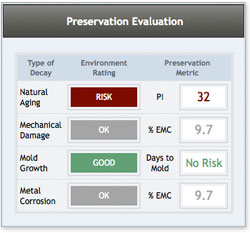
Screenshot of the second step in using a dew point calculator, showing the results after entering temperature and humidity values.

Each combination of T, RH and DP determines the environmental rating for four major forms of material decay—natural aging or chemical decay, mechanical damage or dimensional change, mold risk, and metal corrosion.

Note that these ratings evaluate a static condition and don’t take change over time into consideration. The Environmental Ratings and Preservation Metrics would vary if you were evaluating data collected over a period of time.

PI = Preservation Index

PI represents the overall rate of chemical decay in organic materials based on a constant T and RH. A higher number indicates a slower the rate of chemical decay. (IPI developed the Time-Weighted Preservation Index, or TWPI, to illustrate chemical decay as the environment changes over time.)

%EMC = % Equilibrium Moisture Content

Hygroscopic (water-absorbing) materials change size and shape depending on the amount of water they contain. These physical reactions are based on the amount of moisture in the air (RH). Maximum %EMC (≤ 12.5%) indicates a damp environment while Minimum %EMC (≤ 5%) identifies a dry environment. These conditions, as well as wide and/or frequent fluctuations can result in mechanical damage.

MRF = Mold Risk Factor

The MRF represents the risk of mold germination and subsequent growth. A value of 0.5 or less indicates an environment with little or no risk of biological decay. 0.5 indicates that mold spores are half way to germination. In a real-life situation the environment would be evaluated over time to create a running sum of progress toward mold germination

Guide to Environmental Ratings used by the Dew Point Calculator:

Natural Aging
TWPI Value (years)
Interpretation
≥75
box with a green background and the word Good in white
45 ≤ and < 75
box with a gray background and the word Ok in white
< 45
box with a red background and the word Risk in white

Mechanical Damage
% EMC
Interpretation
≥ 5 AND ≤ 12.5
box with a gray background and the word Ok in white
≤ 4.9 OR ≥ 12.6
box with a red background and the word Risk in white
NOTE: On the Dew Point Calculator, there is no "Good" rating for Mechanical Damage

Mold Risk
Days to Mold
Interpretation
No Risk
box with a green background and the word Good in white
> 1 day to mold
box with a red background and the word Risk in white

Metal Corrosion
% EMC
Interpretation
< 7.0
box with a green background and the word Good in white
7.1 ≤ and < 10.5
box with a gray background and the word Ok in white
≥ 10.5
box with a red background and the word Risk in white

Step 3 - Environmental Management

Understanding the interaction of T, RH, and DP can help you plan, evaluate, and manage storage environments with respect to preservation benefits, decay risks, or the realities and capabilities of your mechanical system.

Example: Managing Dry Conditions

Dealing with low RH levels during the winter season in cold climates is a common problem. Dry conditions can have a negative effect on vulnerable materials. When the DP temperature is as low as 15°F (-9°C) there is very little moisture present in the air. Without humidification, the low outdoor RH is approximately the same as the indoor RH.
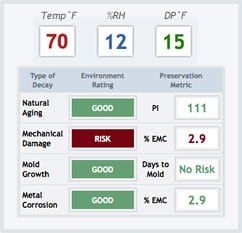
Winter Dryness

The DP Calculator helps you understand what the consequences for indoor RH might be when the outdoor DP is very low.

  1. Go to the Dew Point Calculator
  2. Click to Solve for %RH
  3. Move the Dew Point slider to 15oF (-9oC)
  4. Move the Temperature slider to a human-comfort temperature (70oF).
  5. Observe the %RH as you change the Tempurature setting
  6. Notice the changing Environmental Ratings as well.


In the illustration above the resulting RH is very low and there is a risk of mechanical damage due to dry conditions if these conditions persist over several months.

Example: High Humidity

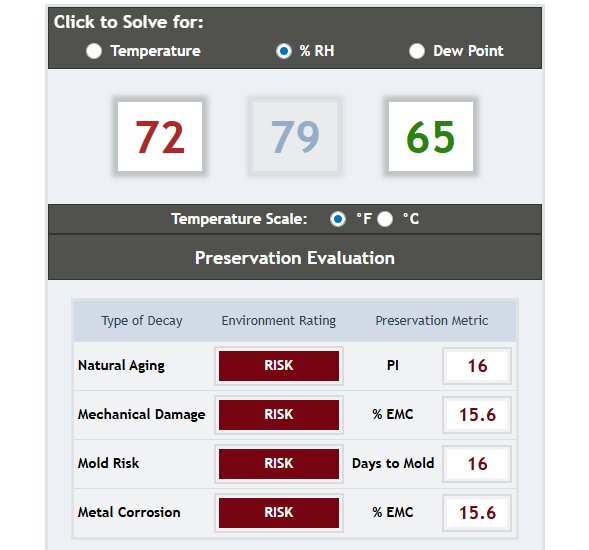
The graphic below illustrates a summer environment with damp conditions, and a risk rating for every type of material decay. Go to the DP Calculator and click on Dew Point to determine what summertime dew point temperature would be required to provide a lower RH and a cool temperature
Graph showing the relationship between temperature and relative humidity, highlighting areas of high humidity


Consider two options to raise the %RH and reduce the impact of DRY conditions:

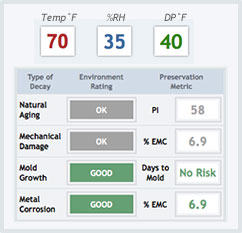
1. Humidify the air (raise the DP temperature) Preservation Metrics for a temperature of 75 degrees Fahrenheit, a relative humidity of 35%, and a dewpoint of 40 degrees Fahrenheit
2. Heat the air less (decrease the temperature) Preservation Metrics for a temperature of 50 degrees Fahrenheit, a relative humidity of 25%, and a dewpoint of 15 degrees Fahrenheit
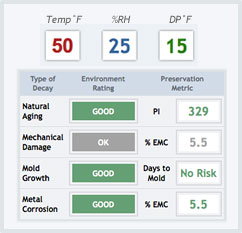
Both options raise the %RH but the preservation consequences are different.

#1. Requires MORE energy to humidify the air and receives only an OK rating for Natural Aging.

#2. Requires LESS energy to heat the air and receives a GOOD rating for Natural Aging.

The PI Metric in #2 is 3 times greater than the original scenario and 5 times greater than option #1.


