Administrative Privileges
Obtaining Administrative Privileges
Required Training
ALL RIT users with administrative privileges MUST take RIT Information Handling Training ANNUALLY and within 30 days of being granted administrative privileges. The training is available through WorkDay. This is a University-wide requirement and does not vary by support organization.
Approval and Accountability Processes
Admin privileges are governed by the RIT Desktop and Portable Computer Standard.
Because admin privileges increase risk, your dean or divisional VP (or their designee) must APPROVE administrative privileges and understand the inherent risk of granting those privileges. In other words, they must agree to accept the increased risk of you having administrative privileges.
Specific processes for obtaining administrative privileges vary by RIT support organization. Note that granting administrative privileges is a shared decision between the Dean/VP and the RIT Support Organization.
| RIT Support Organization | Process | Notes/Links |
|---|---|---|
| ITS | Administrative Privileges Request (ServiceNow Ticket) | Requires Dean/VP approval and completion of attestation. KB0044849 |
| Saunders College of Business | Submit request to techsupport@saunders.rit.edu | Requires Dean approval. |
| NTID | NTID Request Form | Requires supervisor and AVP IT and College Operations NTID approval. All steps are tracked through FreshService. |
| GCCIS | GCCIS Administrative Privileges Request Form. Submit completed form to gccisit@rit.edu | Requestor reviews GCCIS Administrative Privileges Policy. |
| GIS | Request form from GIS Support | Adobe Sign, Supervisor and Dean approval. |
| RIT Libraries/Center for Teaching and Learning | Submit ticket | Support staff will provide user a form, appropriate level administrator signature required. |
| CET | Submit request form | Review CET Faculty Administrative Privileges Policy and submit request form. |
| CAD | See Notes column |
Faculty/Staff sign our Loan Agreement (vetted by legal in the 2010s) when they are hired and operate as standard users on their devices. MacOS users have the ability to promote themselves to administrators via Privileges app that will revoke their privs in 20 minutes or after a reboot. Priv escalation can be regranted at any point. Windows users can ask to be admin via a CADTech Help Desk Ticket, but this is handled on a case-by-case basis. Granted mainly to researchers. |
Admin Privileges Needed/Not Needed
At RIT, centralized management of computers, using products such as InTune and JAMF, provides us the ability to provide the software needed by the majority of RIT users through the Company Portal (Windows 11) and RIT Self Service (iOS), with pre-authorized software installations.
The table below provides some examples of when administrative privileges are needed and not needed. We recognize that the table does not encompass all use cases.
| Action | Needed/ Not Needed | Notes |
|---|---|---|
| Automated Updates | Not Needed | Many applications and system updates are managed through back-end management tools at RIT. These systems help ensure that software is kept up to date without the need for individual users to have admin privileges, allowing for a secure and streamlined process. Some updates may be deferred. |
| Updates to products in Software Center, Company Portal, or RIT Self Service (iOS) | Not Needed | Examples include Adobe Creative Suite, Microsoft products, Google Chrome, and Zoom. |
| Third-party applications | Varies. Discuss with IT support. | Third-party software installation may be complex and vary by application. Additionally, unvetted products may increase risk to RIT. |
| Printer Mapping | Likely Not | RIT is exploring centralized printer management and Follow Me printing. |
| Changing System Date and Time | Needed to change system date/time | Changing system time is a method attackers use to hide their activities. |
| Changing Time Zone in Calendar | Not needed within Outlook | Outlook allows adding more than one time zone to your calendar |
RIT Position on Administrative Privileges
RIT’s position is based on industry standards and the NIST CyberSecurity Framework (NIST CSF). The NIST CSF framework guides organizations to adopt specific principles and controls across six functional areas: Govern, Identify, Protect, Detect, Respond, and Recover.
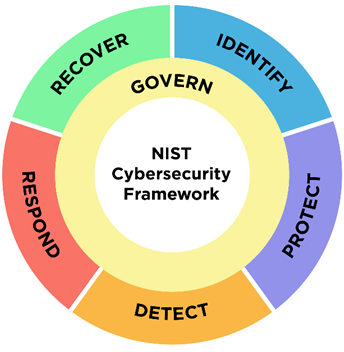
Admin privileges fall under the functional area of Protect and the category of Access Controls (NIST CSF 2.0 Implementation Examples PR.AA-05).
The Principle of Least Privilege applies to administrative privileges.
The Principle of Least Privilege
Definition: A security principle that a system should restrict the access privileges of users (or processes acting on behalf of users) to the minimum necessary to accomplish assigned tasks. To paraphrase, admin privileges should only be granted briefly and only when required.
Minimum Access: Users, software, and automated processes should have only the rights and permissions absolutely required to perform their designated tasks.
Reduced Risk: By limiting privileges, organizations reduce the potential for unauthorized access, data breaches, accidental damage from errors, and malicious actions.
Scope Limitation: It limits the potential impact of a system component's failure, corruption, or misuse.
Risk Management Considerations
In a university setting, managing admin privileges and following the security principle of least privilege are crucial. Universities handle a large amount of sensitive data, including student records, research data, and financial information. A compromised account with administrative privileges can cause breaches, data loss, and even system-wide outages.
Administrative privileges are limited to specific users in order to prevent unintentionally configuration errors, security breaches, or unauthorized access to critical data.
We recognize that not having administrative privileges may create delays in some software installation scenarios. However, we’ve also seen RIT users with admin privileges fall victim to ransomware attacks, with the increased privileges contributing to a resulting loss of research data.