Academic Success Plans
Access your Academic Success Plan
A Starfish Academic Success Plan outlines recommendations (called To-Do’s) to help you return to good standing. If you have met with someone from your college to design an Academic Success Plan, you can follow the instructions below to access your plan and update your team about tasks you’ve completed.
When an Academic Success Plan has been created in Starfish, it will be sent to your RIT email address. It will also be available to you anytime in your Starfish account.
- Access Starfish
- Click the navigation menu
 in the upper left corner of the screen.
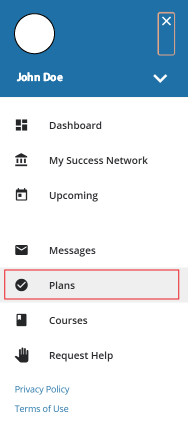
 - Once the menu opens click on Plans.

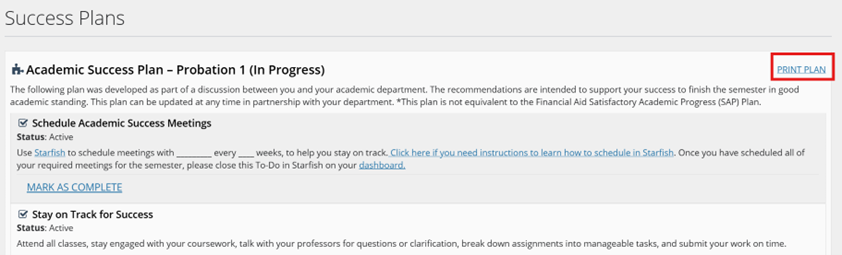
- On this screen, you can view any Success Plans created for you.
- To print the plan, click the Print Plan link in the top right corner.
Complete a To-Do Item in an Academic Success Plan
Once you’ve finished a task, you can mark a To-Do item as complete in your dashboard, letting an advisor know your progress toward your plan. There are two ways to complete a To-Do items in Starfish.
Complete a To-Do Item in the Plans Tab
- Access Starfish
- Click the navigation menu
 in the upper left corner of the screen.
 - Once the menu opens click on Plans.
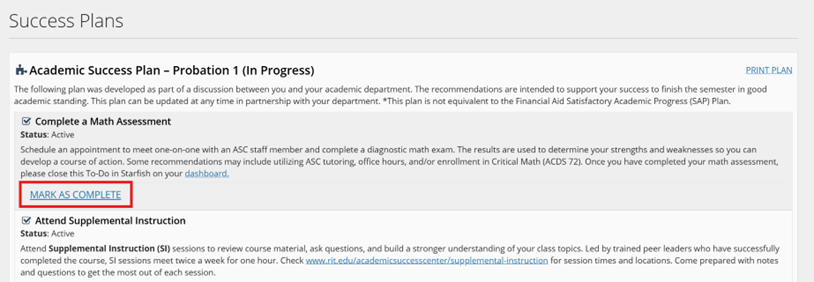
- Your Success Plans and its To-Do items from the plan will be displayed.
- If you have completed one of the To-Do items, select the Mark as Complete link.
- A pop-up will appear on the right side of the screen. It will provide two options as a reason to complete the item.
- I completed this item!
- I don’t need to do this item.
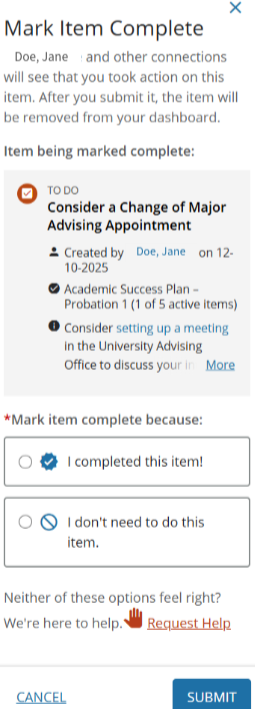
- Then click Submit.
Complete a To-Do Item in the Dashboard Tab
- Access Starfish
- Click the navigation menu in the upper left corner of the screen.
- Once the menu opens click on Dashboard.
- Your To-Do items from the plan will be displayed in the Notifications section.
- If you have completed one of the To-Do items, select the Mark as Complete link.

- A pop-up will appear on the right side of the screen. It will provide two options as a reason to complete the item.
- I completed this item!
- I don’t need to do this item.
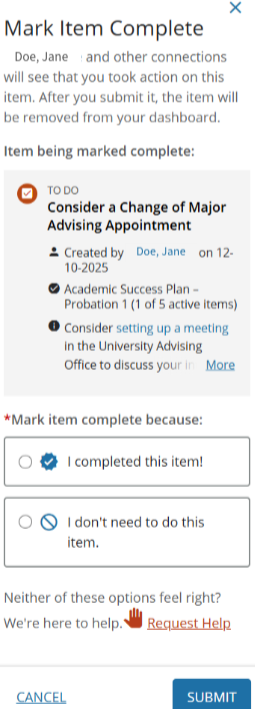
- Then click submit.