myCourses

myCourses Updates
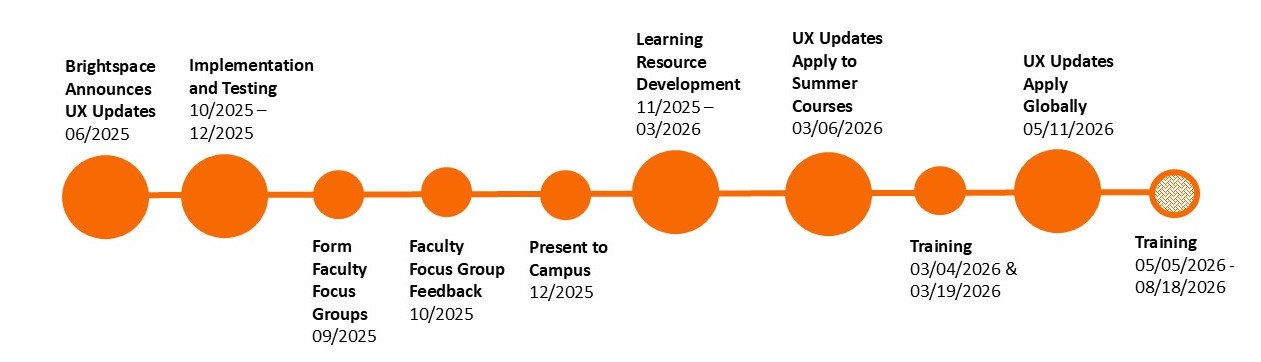
The Center for Teaching and Learning is excited to announce a myCourses (Brightspace) refresh, starting with Summer 2026 courses. The site-wide update was applied on May 11, 2026 between active semesters. Please contact the Center for Teaching and Learning with any questions.
This refresh was prompted by consistent faculty survey feedback which highlighted frustration with the current design of myCourses. Based on this feedback, we worked with faculty focus groups to review possible changes in tandem with a planned vendor refresh.
Get Started
Additional Resources
- How to Navigate the New Content Experience in myCourses
- Training Videos (8 videos approximately 1 minute each)
- Reach out out for more help
Timeline
Technology Overview
myCourses is RIT's Learning Management System (LMS). It uses the Brightspace by D2L platform, but is branded as myCourses. Instructors create course materials, deliver the content, and monitor and assess student performance with assignments, quizzes, grades, etc. Students have a central repository of course information, assignments, and expectations to allow for easy access and planning for time management. myCourses can be used in fully online, hybrid/bended, and fully in person courses.
Use Case and Benefits
- Automatically add students to your courses based on SIS enrollment with the option to add additional students and support personnel as needed.
- Course content and activity instructions can be accessed consistently across courses, for student ease of use and continuity of instruction.
- Assignments: A central location to collect assignment files. Build a consistent rubric and quickly score against that rubric.
- Quizzes: Automatic grading, randomized quiz banks, timed quizzing, automatic start and stop of quizzes, integrations with textbook publishers.
- Discussions: Encourage out of class participation in discussion.
- Grades: Pass assignments/quiz scores to the gradebook automatically. Automatic tallying of student overall class grade.
- Reuse course materials from semester to semester.
- Use the Ally integration to improve the accessibility of your course materials.
Accessing the Technology
Browser-based tool. Access myCourses and log in with your RIT account.
Option to install the Pulse app on mobile devices for course viewing only.
Learn More & Get Help
To start learning about myCourses, review the following curated resources:
- Finding Your Courses on myCourses
- Customize the myCourses Navigation Bar
- Customize a myCourses Home Page
- Overview of the Content Tool
- Overview of the Grades Tool
- Overview of the Assignment Tool
- Overview of the Discussion Tool
- Overview of the Quizzes Tool
- Overview of the Announcements Tool
- Overview of the Classlist Tool in myCourses
- Overview of the Calendar Tool in myCourses
- Overview of the Rubric Tool in myCourses (Instructors)
- Overview of the Groups Tool in myCourses (Instructors)
- Third-party Integrations in myCourses
Additional resources are available in the CTL knowledge base.
- Access the CTL Knowledge Base and log in with your RIT account.
- Use the search box at the top of the page to find resources by keywords.
- Use the Categories in the left side navigation to find resources by topic area.
Instructors may also attend a group training or request a consultation for training.
For technical issues and other support, contact the Center for Teaching and Learning.