Foundation Data Model (FDM)
What is the FDM?
The Foundation Data Model (FDM) is the core financial structure within Workday. It serves as the backbone for all financial transactions and reporting - providing a standardized way to organize, categorize, and analyze financial data. Check out this quick video that Introduces the FDM before exploring the information presented on this web page.
Accuracy & Consistency
The FDM drives all financial activity within Workday. Every expense, journal entry, budget, and report relies on the FDM to determine how data flows through the system. By using a common framework, RIT ensures that financial information is accurate, transparent, and aligned with institutional policies.
Using the FDM
The FDM is built into many business processes within Workday, such as submitting expense reports or creating journal entries. Workday relies on Worktags to define the purpose, source, and other details related to the financial transaction. Users enter all applicable Worktags when prompted to ensure accuracy within the system.
What are Worktags?
In Workday, Worktags are labels that classify and organize financial transactions. These labels tell the system WHAT the transaction is for, WHO it relates to, and HOW it should be categorized and reported. Worktags replace traditional account strings, making financial data more flexible and easier to manage.
Every financial transaction in Workday requires Worktags to ensure accurate accounting and reporting. Examples of common Worktags include:
- Cost Center – Identifies the department or unit responsible for the transaction
- Fund – Indicates the source of money (e.g., operating, grant, endowment)
- Spend Category – Defines the type of expense (e.g., office supplies, travel)
- Program – Links the transaction to a specific initiative or project
Learn more about all 14 Worktags using the interactive features below. First time users may be required to sign-in with their RIT credentials.
Interactive Description of All Worktags
Below is a visual aid that provides details about all 14 Worktags in Workday. Click on each block to view the Worktag's definition, code formatting, and what it's used for. Additional information about Driver Worktags can be found in the next section.
Driver Worktags - Which One to Enter First?
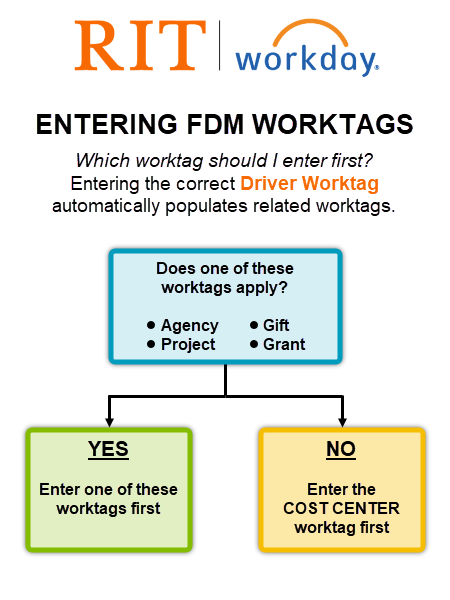
A Driver Worktag is a special Worktag used to automatically populate related Worktags based on predefined rules. There are 5 Driver Worktags that can be used when completing related operational transactions:
| Agency | Project | Gift | Grant | Cost Center |
For example, entering a Grant Worktag into a business process or transaction will automatically populate these related financial dimensions: Cost Center, Fund, Program, Operating Unit, and Center (if applicable). These values are set up as defaults and linked to that specific Grant. This feature saves time and minimizes errors by linking related financial dimensions together. Review the graphic below to determine which Driver Worktag should be entered first.
Translating Oracle COA to Workday FDM
With RIT’s transition from Oracle to Workday, the way we classify and process financial transactions has changed significantly. Oracle's accounting structure was known as the Chart of Accounts (COA) and consisted of a 24-digit combination of six different code segments.
- In Oracle, financial data was organized using account strings that represented different segments (such as Department and Object Code).
- In Workday, these account strings are replaced by the Foundation Data Model (FDM), which uses Worktags to provide a more flexible and intuitive structure.
The translation of Oracle account segments to FDM Worktags is NOT a one-to-one match. The following points are helpful to remember when learning the FDM structure and its Worktags:
- An Oracle segment might not correspond to a single Worktag
- A single Worktag might be the result of more than one Oracle segment
- A single Worktag might not have a "legacy" Oracle segment
How Oracle Segments Map to Workday FDM
Click on the interactive elements below to learn more about how Oracle account segments were translated into the FDM.
Report and Account Finder Tool (RAFT)
A translation tool called the Report and Account Finder Tool (RAFT) has been created to assist users in identifying the correct Worktag codes to use based on the legacy Oracle account segments. Review the RAFT Quick Start Guide below and learn how to access this tool and utilize its search capabilities.
Oracle-to-Workday Cost Center Lookup
Use the web app below to quickly identify a matching Workday Cost Center for any Oracle department name or number. This tool helps you confirm the correct values to use during RIT's transition to Workday. Data continues to be updated, so check back regularly for the latest information.
Note: Click Allow when prompted to enable full search/export functionality. Exported results may require you to Allow Pop-Ups in your web browser before the file can be downloaded.