CET Software Recommendations
- RIT/
- College of Engineering Technology/
- Academics/
- CET Student Tech Guide/
- CET Software Recommendations
During your time in the College of Engineering Technology, you’ll work with a range of software applications that are commonly used in your field. This page shows you which tools you may need, how to get them, and what you should know about student licensing.
Students using macOS, read here first!
The majority of this software requires a Windows operating system. We would overwhelmingly suggest using a Windows computer.
If you'd like to attempt to run Windows on a Mac, we suggest utilizing VirtualBox as a free solution to get a Windows virtual machine set up to utilize these software packages. However, we cannot and do not offer support or assistance with any of these options.
Note: If you have a newer mac, using Apple Silicon, running a Windows virtual machine may not be possible. Your results will vary. You'd also need to install an Arm version of Windows. The majority of our software does not run on Arm. For a Windows license, please refer below to Microsoft Windows Operating Systems
Students must obtain their own Creative Cloud licensing.
As a student at the Rochester Institute of Technology you are entitled to a license for Microsoft Office 365 at no charge.
Students have access via Microsoft Azure for Education. You'll log in with your RIT computer account.
Civil Engineering Technology, Environmental Management and Safety
ArcGIS
A personal license isn't available for free, however, esri offers a Student subscription tier.
ArcGIS Pro
- Log into https://ritarcgis.maps.arcgis.com
- Once logged in, navigate to https://my.esri.com/#/downloads/products
- Select ArcGIS Pro on the left to find the download links.
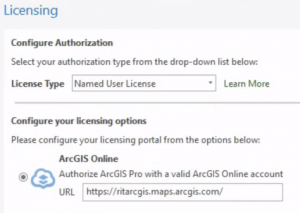
- Once installed configure licensing as such:
Note: Autodesk releases software to the students and public portal before we're able to get it for University use. Double-check the version/s used in your classes/labs.
Go to this page on our wiki for detailed instructions: Bentley Education
A personal license isn't available for free, however, HydroCAD offers a Semester long license for students.
Electrical and Computer Engineering Technology
https://www.altium.com/documentation/knowledge-base/altium-designer/apply-renew-student-license
For Assistance with Student Licensing:
ECET courses use version 1.8.19.
Courses may require certain libraries or add-ons. Please reference your syllabus or professor for what libraries or add-ons you may need.
Cadence offers a student license.
Cubase offers a 30 day trial.
Cycling '74 Max licensing is not available for personal devices.
However, a 30 day trial is available via their website at https://cycling74.com/downloads.
Dante Via & Dante VirtualSoundCard licensing is not available for personal devices.
ExpressPCB Classic is available from their website at not charge, however, you will need to provide your email to receive a download link.
Current Faculty, Staff, and Students can install MATLAB on their personally owned computers if their physical campus is the Rochester, NY campus. If you are at a global campus, you are not allowed to use this license at this time.
Please reference the ITS Software for Personal Computers page for the most up-to-date information on how to obtain MATLAB for your personal device.
Courses may require certain libraries or add-ons. Please reference your syllabus or professor for what libraries or add-ons you may need.
Minitab licensing is available for students at no cost.
Please reference ITS Minitab page for the most up-to-date information on how to obtain Minitab for your personal device.
ModelSim-Intel® FPGAs Standard Edition Software Version 18.1 is available for free.
Please see the documentation here.
Avid offers free trials for ProTools.
Intel offers a handful of lightweight versions of their software for free. Most notable for you will be Quartus Prime Lite.
https://fpgacademy.org/tools.html
Fully-featured Quartus Prime licensing is not available for personal devices.
The software required for the RTOS courses will need to be obtained from the Software Share on CETSTUDENTS. Instructions on how to access CETSTUDENTS can be found here.
Once obtained from the Software share, follow the instructions in the Read Me.txt file in the 0 - Read Me First folder to install everything.
For Reference, the Software used is:
- FreeRTOS
- STMicroelectronics STM32CubeIDE
- STMicroelectronics STM32CubeMX
- STMicroelectronics ST-LINK Server
- STMicroelectronics Studio
- STMicroelectronics Virtual COM Port Driver
Note: TI often changes the link above, if that link stops resolving their main downloads landing page is here: https://education.ti.com/en/software/search
https://visualstudio.microsoft.com/vs/community/
Our C++ courses utilize the Desktop Development with C++ workload, this can be selected during installation.
Xilinx offers a free, limited-feature, version of their software (Standard Edition Free)
https://www.xilinx.com/products/design-tools/vivado.html#editions
Manufacturing and Mechanical Engineering Technology
These applications can be accessed as a Remote App by following the instructions below:
- Visit https://mmet-remoteapp.main.ad.rit.edu/RDWeb.
- Enter "MAIN\username" and substitute your username. Enter the password associated with your username.
- Select your desired application. A small Remote App file will be downloaded. Run the file.
- In the remote app dialog, enter "MAIN\username" and password, make sure that Drives is checked, and choose connect.
- When using Studio 5000 and you want to connect your laptop directly to a controller, follow these instructions.
These applications can be accessed as a Remote App by following the instructions below:
- Visit https://cetapps.ad.rit.edu/RDWeb.
- Enter "MAIN\username" and substitute your username. Enter the password associated with your username.
- Select your desired application. A small Remote App file will be downloaded. Run the file.
- In the remote app dialog, enter "MAIN\username" and password, make sure that Drives is checked, and choose connect.
Current Faculty, Staff, and Students can install MATLAB on their personally owned computers if their physical campus is the Rochester, NY campus. If you are at a global campus, you are not allowed to use this license at this time.
Please reference the ITS Software for Personal Computers page for the most up-to-date information on how to obtain MATLAB for your personal device.
Courses may require certain libraries or add-ons. Please reference your syllabus or professor for what libraries or add-ons you may need.
Access the downloads for Studio 5000, Emulate, and FT Optix at the following links. CAUTION: They are zipped, and very large. Please allow a long time to download.
- 36.00.02-Studio5000-Web.zip (11.09 GB)
- 36.00.00 - Studio5000LogixEmulate-DVD.zip (2.91 GB)
- FTOptixStudioSetup_Win32_1.5.0.692.exe (1.48 GB)
- FTView.zip (6.18 GB)
For students who require a license for their personal computer: https://help.rit.edu/sp?id=kb_article_view&sysparm_article=KB0038518.
Packaging and Graphic Media Science
Students must obtain their own Creative Cloud licensing.
As a student at the Rochester Institute of Technology you are entitled to a license for Microsoft Office 365 at no charge.
For students who require a license for their personal computer: https://help.rit.edu/sp?id=kb_article_view&sysparm_article=KB0038518