Community of Practice Q&A
Jul 23 | Managing Recurring Stipends in Workday
What are the First Invoice Date and End Date when setting up the recurring stipend payment?
The First Invoice Date determines when the first scheduled stipend payment is generated. Submit the request early enough to allow all approvals to be completed before that date. The End Date should align with the semester or period during which the participant will provide support.
Stipends paid through A/P do not follow payroll schedules. We recommend a semi-monthly schedule, with payments targeted for the middle and end of each month. A/P releases payments several business days before the intended payment dates—generally the 15th and the 30th or 31st. Processing is not tied to a specific day of the week and may vary by month.
If you manage payments for many participants across same period ideally you would want to standardize and use the same dates on all requests, so your participants are paid on the same schedule.
What is the recommended end date for stipends so that there is no overlap between semesters?
If you have participant who is receiving stipends across semesters (for example, spring and summer sessions), it is ideal to align the end dates of the requests to the Academic Calendar to ensure no overlap.
Should the Transaction Detail worktag TD000112 be added to all participant stipends regardless of other worktags?
Not necessarily; sponsored projects (Grant worktags) require it, but it is up to the discretion of the department or college if they would like to use it for operating, gift, or project accounts. Omitting this worktag will not cause any issues.
Is there a way to check on the approvals for my supplier invoice request?
For previously submitted requests, search your Workday task archive and open the process history for available status details (refer to this knowledge article for specific instructions). You may not have access to the full approval workflow. If you need help identifying where a request is delayed, submit an RSC ticket to Accounts Payable. We are also working with the Workday team to evaluate additional access and permission options.
Recurring Supplier Invoice payments do not typically route through Cost Center Financial Specialists. Will this position be added to the approval chain in the future?
The Workday team actively meets with stakeholders and system developers to ensure approval routings are set up appropriately.
How do delayed approvals affect a stipend payment if the first payment date is missed before final approvals are made in Workday?
Delayed approvals will prevent the release of the first scheduled installment payment. Once fully approved, the scheduled installment will be processed. If you identify an issue in the number of payments or total amount, submit an RSC ticket to Accounts Payable for review.
If delays in the paperwork prevented the request from being raised and approved, you may need to enter two separate requests:
- A supplier invoice request to process a one-time stipend including the full amount that is due
- A recurring supplier invoice request to pay the remaining scheduled stipend installment
Jul 16 | Payroll & Time Tracking Best Practices
When is the deadline for approving timecards?
The deadline for approving timecards is 9:00 AM on Monday following the pay period end date. Timecards reopen at 12:00 AM on Thursday of that week. Refer to this knowledge article for more details.
How do I fix an error that occurs when I use a combination of the physical timeclock and online check in/out process?
Refer to this knowledge article for troubleshooting tips and more information.
What is the warning that suggests a worker has worked for more than 6 consecutive hours without a meal?
Punches record down to the second (review this knowledge article for more information). It is safe to ignore this warning if the meal break is ~30 minutes. The Workday and Payroll teams are exploring options to adjust the trigger threshold to 29 minutes and 30 seconds with the intention of minimizing false alerts.
Do I need to adjust a worker’s timecard by a few seconds to fix the meal warning?
If the employee is working 6 hours, it is ok to ignore the warning.
Some timecards are showing time worked as a value slightly over 80.0 hours for a two-week period (e.g., 80.001 or 80.12). Do I need to have those fixed?
No, hourly employees should be paid for ALL time worked, so punches like that should remain for accuracy and consistency.
For student staff members who are using the mobile app, I've noticed that the location of the punch in/out is almost always Eastman building. Does the app actually tag to the building on campus the staff person logged in from?
Not always; the mobile app displays the default location assigned to the job profile (which is Eastman Hall for most student jobs), not the actual physical location where the app was used.
If an AM check in punch is missed, the system requires that you complete your out punch at the same time, so this is not in real time. Is there a way to complete the in-punch only and then the out punch when you actually take your meal break?
When editing a timecard you can only create a complete time block. You are not able to add a punch only on to the time card.
If a student employee fails to set up direct deposit, is the check mailed to the address listed in SIS?
Yes, Workday updates address data daily from SIS.
When reviewing student time entries, is it possible, to restrict the timecards I see to only those for our jobs, not the other jobs the same students might have?
This depends on how a manager/timekeeper reviews student time entries. It's recommended to use the following report: Time Tracking Hours by day with Position.
If a student requests sick time and has at least two jobs, is the supervisor of the primary job responsible for approving it? Even if the sick time request is for the non-primary job?
Yes, workday requires the manager/timekeeper of the Primary Job to approve the sick time.
Is sick time covered by the primary job even if it's requested for the non-primary job?
No, sick time can be costed to the correct position and must be selected at the point of the request. Depending on who initiates the time off request, the Primary Manager may be the approver of the request.
- Employees initiating a Sick Time Request through absence management can select the appropriate position and this will route to the Primary Manager only for approval.
- Requests initiated by the manager of a Primary or Non-Primary position will be fully approved upon entry.
Are reports on the Time and Scheduling Hub only able to be run by the manager or someone that has HR Partner role for that sup org?
These reports are available to both Managers and Timekeepers. If there are HR data fields not accessible to a Timekeeper, these will be blank.
Which of these reports can the Timekeeper see/pull?
Timekeepers can view all listed reports by navigating to Time & Scheduling Hub > Operational Analytics > Team Insights > Reports/More.
Do we know what position changes that timekeepers can/cannot do?
The Timekeeper role is only associated with the Enter Time Business Process and will not be able to process any updates to position assignments through this role.
I want to see how to find a cost center specialist
- Type the Cost Center number into the search bar (for example, CC12345).
- On the tab labeled Roles, you will find a list of assignable roles; filter this to find the Cost Center Payroll Specialist.
- In the role details, you will find out who this is assigned to.
- If there is no specialist assigned, please follow up internally to confirm who should have this role assigned. (Note that this role can be requested the Workday Role/Access Request form in the RSC).
Is there a plan to make Student Period Activity Pay (PAP) viewable for people that are not in timekeeping roles?
Period Activity Pay (PAP) is a compensation element of the system. The Timekeeper role is only associated with the Enter Time business process approval and will NOT be able to view PAP details.
On sign off day, if the manager finds an issue and corrects it, that block becomes 'not submitted'... If the student is unavailable, and does not approve a modification, what happens Monday?
All Time will be submitted and manually advanced by payroll (this is considered an exception to policy and is part of our payroll controls). The best practice is for the manager or timekeeper review and then Submit any modifications to the time block rather than saving it for a later time.
What if I use 'send back' on a request for sick time from my student employee? Does that not go back to the employee?
DO NOT use the Send Back action because it routes the request to Payroll, which prevents our specialists from making any changes. Managers, timekeepers, or employees should make changes directly.
Jun 18 | Fiscal Year-End Review
What is the best report to get a list of all POs and find POs that I might not be aware of?
If you are a CCM, you have access to "Find Purchase Order Line and Line Splits for Organization" report. This will show all PO lines by the cost centers you are assigned. If you see multiple cost centers - you need to filter the data by a specific Worktag (such as Cost Center or Operating Unit).
For Oracle POs: If you do not have access to the report above, or can’t find them in Workday, please review this RSC article.
Is there something better than “My Requisitions” to find POs?
Yes - the same report listed above provides a more complete view across your assigned cost centers. This job aid contains additional details on how to find a Purchase Order.
What is the Requisition Hub?
Accessible via Organization > Requisitions in Workday. It shows both open and complete requisitions. Review the Requisition Hub Job-Aid for more details.
What does “Extended Value” mean on PO reports?
It represents the total value of the line (quantity × unit price).
How can I see remaining balances or encumbrances on POs?
There are two ways to find encumbrances in Workday:
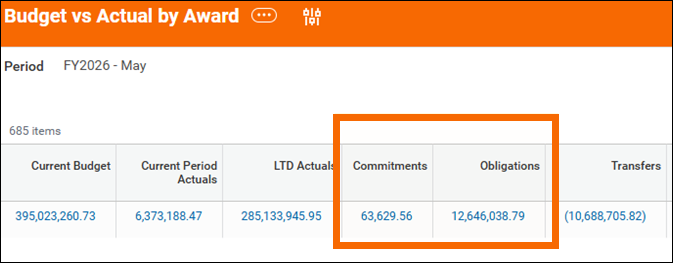
1. Review the Commitment and Obligation columns of the specific statement (any of the Operating, Gifts, Grants, Agencies, or Projects statements will have these details). The example below shows how to get to the encumbrances using the Grant statement. Note: This method is contingent to the end user having the appropriate access.
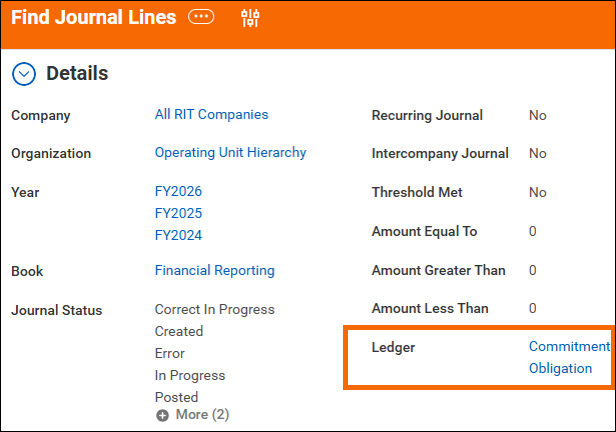
2. Run the Find Journal Lines report and enter the following into the Ledger prompt: Commitment, Obligation. This prompt appears at the bottom of the prompt screen. Users with central access can run the report for all cost centers while non-central users can run it only for their assigned organizations. Be sure to filter out canceled and unposted journals using the Journal Status prompt or filter.
Is “Find PO Lines” a keyword search in Workday?
Yes, depending on your Workday security access. Search for the full report name: “Find Purchase Order Line and Line Splits for Organization.”
Will a reference guide of key dates be provided?
You can access information on key dates in the Controller’s website at the Year-End Closing Policies and Procedures web page.
Is procurement using the $5K accrual threshold for unvoiced receipts?
No -all receipts for goods and services not yet billed will be accrued.
What report replaces Encumbrance Detail for division-level visibility?
Refer to this question in the section, above. There are two ways to drill down to finding encumbrances in Workday.
Will there be a centralized list of report names and descriptions?
Yes, the Report And Account Finding Tool (RAFT) is a Copilot Agent that identifies/maps current Workday reports and allows you to cross-reference previous ones from Oracle. Check out the RAFT Documentation and Quick Start Guide on the Operation Tiger Cloud website.
What security/access roles are required to run key reports?
Most Workday reports are available to staff with specific roles and access levels. At this time, there is not a mapping of which reports can be accessed by someone with a specific role. If you cannot run a specific Workday report, please submit this RSC request and include the type of report or data you are trying to access.
What happens this year if we miss the deadlines for depositing checks at SFS?
The check will still be deposited but it will hit July FY2027.
Has the final close date (July 15) changed? What is the due date for PAAs?
Payroll Accounting Adjustments (PAAs) for FY2026 need to be fully approved before final close begins July 15, for Fiscal year end. All payroll accounting adjustments must be fully approved by end of day on July 14th.
How do July PAAs post back to June? If PAAs are approved early July, will they post to June automatically?
The PAA functionality automatically uses the open ledger period to post the adjustment. During the Fiscal year close, July 1 and July 15 dates, both ledgers will be open and the PAA posting dates for check dates prior to June will post to the June Ledger. If you are correcting a July check date, the July period will be used.
Can P-Card charges be coded directly to prepaid?
No, code and then do an accounting adjustment after. Another option is to put the prepayment on a purchase order, if possible.
May 21 | Accounting Adjustments, Journals, & EIB Processing
What fund do I use when setting up a journal entry for the balancing fund?
The balancing fund should follow the fund that is either being charged/expensed (manual journal) or transferred from (transfer entry). For example, if the transaction is between two operating funds, always choose operating as the balancing fund. If the transaction is between an operating fund and a designated fund, select the originating fund (the one you are moving transactions or funds out of).
Does the Budget Date have to correspond to the period of the JE? E.g. can you use an April Budget Date with a May JE?
The budget date controls which budget period is impacted. Leave the budget date as the original date the expense was incurred or the document was created. It should default to the original date, so you do not need to change it.
How do I create a chargeback journal entry to correct the worktags used in the conversion journal entry?
A chargeback’s source journal entry requires an ISD (Internal Service Delivery) spend category with a range of SC00220-SC00299 to be used. Examples include ‘SC00242 - Internal Service Charge Hub Services’, or ‘SC00258 - Internal Service Charges’ for general non-ISD (Hub, Auxiliaries) chargebacks.
Can you fund a project from an agency account?
Users cannot create a transfer journal that has a line(s) with an Agency tag and a line(s) without an Agency tag (similar to Oracle where transfers could not be made between entity 01 and entity 09). If a user needs to 'move' funds from an Agency account to a non-Agency account, they must use a manual journal source that has 'regular' expense/revenue ledgers and applicable spend/revenue categories. A transfer ledger will not be used.
Could I submit an accounting adjustment in the actual expense that hit the project?
Yes, either do a manual journal, or an accounting adjustment if the transaction is an expense report, PCV, or supplier invoice.
Apr 16 | Workday Financial Reports
Is there a way to run a Budget to Actuals report for multiple cost centers without consolidating the results?
Yes. Users can run the report for multiple cost centers and keep them separated by:
- Entering multiple cost centers in the Organization prompt, and
- Using “Cost Center” in the “Repeat By” field.
This allows the report to break out results by cost center rather than consolidating totals.
Why does the Budget to Actuals report generate all zeros for NTID users?
NTID users must run the “Budget to Actuals – NTID” version of the report. The Budget Name field is required for NTID reports; if it is not populated, the report will generate zeros. If issues persist, users are advised to look up answers in the RSC and/or submit a ticket, as some cases may be related to access or security.
Can Find Journal Lines provide true beginning and ending balances similar to the Oracle General Ledger?
No. Workday cannot calculate balances at the journal line level. For balances, users should rely on Trial Balance Standard report.
When exporting to Excel, do users need to manually expand each account or object code?
No. While individual rows can be expanded manually, users can also expand all levels at once in Excel using the outline controls (e.g., clicking “2” or “3” at the top of the spreadsheet). A demonstration of this functionality was referenced during the session.
Can filtered Workday reports be exported to Excel while retaining the filters?
Filters must be applied at the prompt level in Workday for them to carry through to Excel exports. Filters applied interactively after the report runs will not persist in Excel.
Can vendor or supplier information be added to the Find Journal Lines report?
Supplier information appears only when:
- The Supplier field is populated, and
- The vendor exists as an active supplier in Workday (typically set up via PaymentWorks).
Many P-Card vendors are not set up as suppliers, so supplier data will often be incomplete. Workday cannot compute balances or enrich data at the journal line level; balances are available through Statements and the Trial Balance Standard report instead.
Is there a specific P-Card report that can be used instead of Find Journal Lines?
A P-Card line level report is available titled “My Procurement Card Transactions Verification.”
Feb 04 | P-Card Reconciliation
Do we need our P-card certification packets signed, or is that going away?
Once you verify the transaction they will route to the appropriate approvers the same way the packet used to route manually. So you do not have to do the paper packets any longer - Workday does that for you now.
Is there a way to 'see' where the transactions are in the approval process?
Yes, via the Process History on the PCV.
If the cost center manager and the cardholder are the same person, will they have edit capabilities?
If Cardholder and CCM are the same person, the approval will bypass the later step (in this case the CCM) because they've already 'approved' it as the cardholder.
Is there a way to send a reminder through WD to my manager to approve my transactions (similar to sending a reminder through Adobe for signing packets?)
Approvers are notified when a PCV has entered their inbox for review/approval. There is no mechanism at this time to send a reminder in Workday.
Is it possible for Managers be proxied on their direct reports purchasing?
The cardholder's supervisor is a required approver on the approval chain.
Can there be more than one cost center financial specialist on the same cost center and if so, how does that approval work?
If two people are assigned as a cost center financial specialist for the same cost center, they will both see the transaction but whomever takes action on the PCV first (review/approve), the transaction will then disappear from the others queue. (As only one needs to approve)
What does a deny do to the transaction? If already purchased anyway?
Deny' will end the routing of the PCV. The transactions will be made available again for verification.
Will project managers assigned to specific project accounts be automatically in the approval stream?
If a transaction is charged to a Project account, the Project Manager will be in the approval routing.
Will the approver see the card statement to verify the transactions that they are approving?
Only if the statement is attached to the "packet" would they see the statement.
If we see a submitted report that seems to be stalled, who should we contact?
You can find the awaiting approver by navigation to the "Process History" tab on the submission.
If transactions are batched together and an approver wants an edit done to one of the transactions, when the batch goes back to the approver, does it identify the transaction that was edited?
When a PCV re-routes for approval, changes are not highlighted.
How can my manager send the PVC back to me to correct the receipts?
There is a button in their Inbox task to "Send Back".
If I am the cardholder, how can I check who the next approver is and who the subsequent approver(s) will be?
There is not a way to see this in advance as Workday evaluates at each step who may need to approve. For example: if the CCFS edits the worktags on a PCV to charge a Grant, Workday will re-evaluate the approval workflow to include this new data point. The general approval path is as follows: Cardholder (if PCV creator was a delegee) Cost Center Financial Specialist Cardholder's Supervisor Gift/Grant/Project Manager (when appliable) Cost Center Manager(s) (when amount limits are reached)
I have seen P-Cards come through for approval with individual receipts, which is a pain. Is there anyway to disable the ability to attach indivual attachments to a verification report that has multiple entries?
There is not a way to disable this option. Please work with the cardholder(s) in your area to establish a departmental standard that works for your team.
I started to verify a purchase but it was unfinished. Now it don't see it anymore. How do I find it again?
If you have started a Procurement Card Transaction Verification you can find them by searching "My Procurement Card Transaction Verifications" in the search bar. If your transaction is in draft, you can click on the "..." related actions next to the PCV number , navigate to procurement card transaction and "edit" to edit a PCV in draft.
Do we have to upload the PNC statement when verifying transactions?
No, you do not have to upload the statement unless that's a process you've developed with your team.
Do you have to enter the "unit of measure" and "unit cost" for each receipt?
No, the transaction pulls in the extended amount. Unit of measure and unit cost are not required.
If I have one P-Card, should I batch all my transactions into one verification/packet? Or should I individually verify transactions as they appear in workday?
That depends on your team/approver. Some want them batched by month, some prefer to see them as they come in.
How do you know what spend categories have been enabled for a specific grant or cost center?
If there are spend category restrictions on grants/cost centers, an error would populate letting you know that this spend category is not available for selection and to choose another.
I started several Procurement Card Transaction Verifications this month, all are in draft status still. How do I combine them so that there is only one batch routed for approval?
Under "My Procurement Card Transaction Verifications", if the PCV is in draft status, you can click on related actions and cancel the PCV. If you do this, the transactions will pull back into "Verify Procurement Card Transactions" and you will be able to add it to an existing PCV by using the blue ADD button. Please note that you will have to re-renter the transaction details if you do choose to do this. There is a Job Aid for this task that provides step-by-step instructions.
At what point do the transactions freeze?
PCVs can always be retrieved and edited. Upon approval of the edits, an accounting adjustment will be posted.
Will P-Card transactions show in “My Tasks”?
Cardholders are not notified in their Workday inbox about posted transactions. You can find them by running the "Verify Procurement Card Transactions" report.
What if someone gave me delegations but there is nothing on my landing page?
You would need to switch your profile to the person who gave you the delegation. There is a Job Aid in Workday called "Employee - My Tasks and Delegations" that provides step-by-step instructions.
For those of us with multiple P-Cards, is there a way to sort/filter in the Verify window by card number?
Unfortunately, no. You can view the last 4 digits of the card number by clicking on the Related Actions (...) on the transaction line.
When reviewing each transaction, do we have to do a item description for each item from the purchase, or do we just do a generic line item description for the whole order?
Line Item Description is required for each transaction. If you are purchasing multiple categories of things in one transaction, do your best to capture the description of all items.
If, as a cardholder, I name my colleague as a delegate to verify P-Card purchases, is it best practice to include an end-date, or leave it open ended? Will the delegee get a task notification for each verification that is needed?
You must enter an End Date, but that date can be far in the future. They will retain access to complete the task, but you will need to work together to determine when they will or will not do so.
When we entered our information in ActivePay under the old system, at the end of the month we would produce a report called “Expense Log” that would include our justification notes and account numbers charged. Is there a report like that in Workday?
There is a "Grid View" that will display the transactions in a similar format to the "Expense Log" from PNC. Please see the "Employee - Verify Procurement Card Transactions" Job Aid in Workday.
What are the required Costing worktags?
The required Costing worktags are marked by an asterisk (*). If you have additional questions about worktags, please review the FDM web page.
Under what circumstances are optional fields required (such as Item, Tax Applicability, Quantity, etc.)?
They are never required on PCVs; they are merely available to enter applicable details.
Can you explain the attachment packet. Does that still include the statement along with the receipts for the PVC#?
You don't need to attach the statement unless that's a process your department deems necessary.
If we are submitting batches of transactions under a single PVC number, do we need to attach the receipts in a certain order to the Header Attachments section? Or can we submit them with each individual transaction attachment section?
It depends on how your approver would want to see them. If doing them all at the header level, putting them in order, would make sense. And if you are doing them at the line level instead, you could attach your statement at the header.
I was curious if there was a list of the old object codes, etc. to the new numbers in workday?
A crosswalk for Oracle codes that map to Workday worktags is available through the RAFT.
Will we still be sending any hard copies with signatures to the P-Card Administrator?
No, everything is submitted and completed through Workday.
What are the final steps to complete once all transactions are approved in Workday?
There are no more steps - once the process completed in Workday, there is nothing left to do.
What is the timing requirements of verifying Procurement Card transactions?
P-Card transactions need to be Verified and all Approvals obtained (in Workday) before 8:30am on Day 3 of month-end close. The month-end close process is posted on the Controller's Office website. Any PCVs approved after this date/time will delay posting until the next open period after posting. If deadlines are continually missed, P-Card privileges may be reduced/eliminated.
Can receipts be submitted ONLY in the attachments tab (and not attached to the individual transactions)?
Correct; you have the flexibility within your department to determine which Attachment area you would prefer to use.
Do I enter information into the Tax field on the PCV?
DO NOT use the Tax box on the PCV; it will create inaccurate accounting. If you received a refund on sales tax, you should treat it as you would any other refund transaction by Verifying the transaction and assigning the same Spend Category and Costing as the original transaction.
In My Procurement Card Transaction Verifications list how can I see a column with the Vendor name?
You can see which supplier a transaction applies to under the individual transaction. The field the supplier shows up under is "Charge Description". The same applies to a PCV but since a PCV may have multiple suppliers, you would have to look under each transaction in the PCV.
What if I purchase multiple items in a single transactions? Do I describe each item or a generic note for the whole purchase?
Try your best to describe the entire purchase, but a general note as to what they are for is helpful.
Can I create the PCV group by grant and will that route to the PI for approval? What is the best way to create groupings to be most efficient for the approvers?
We suggest bundling transactions by costing area (and by card, if appropriate). For example, group all of the transactions for a Grant into one PCV so that it routes to the PI; and another PCV for any departmental (non-Grant) transactions so those will not route to the PI for approval.
Can commonly used item categories be saved as defaults?
Not at this time.
If there is a split with another department, and we don’t want the other department to see the other transactions, should that single transaction be entered on its own PVC#?
Yes.
The following error appears when trying to verify transactions: "Page Error Select at least 1 credit card transaction."
This error is appearing because you have no transactions to verify. if you are certain you've made purchases, the card may not be assigned to you in Workday. Please open a ticket with the RSC.
Is the costing already entered for transactions?
The FDM costing defaults to the cardholders position organization costing on each transaction. You can edit these if the costing needs to change.
How do you change the cost center number?
Navigate to the Cost Center field and find the appropriate cost center (search by name or number) to add a different cost center to your transaction.
Can we change the default Costing Worktags for this task?
The Costing worktags on the Procurement Card Verification task default to the cardholder's Position Org Assignment (that is: where their job is costed). At this time, there is no other way to change the default worktags on the PCV task.
What do I do if a particular spend category is not available for a particular expense?
Best practice is to find one that most closely fits your expense.
When you select a grant or project, do the worktags populate automatically (and correctly)?
Grant/Project are driver worktags and will automatically populate the other worktags (cost center, operating unit, fund, program). You will still need to select a spend category as that is not driven by other worktags.
How do I split a transaction charge on a PCV to charge different workday tags/accounts and with a different spend category?
The Job Aid in Workday (called "Employee - Verify Procurement Card Transactions" explains how to split charges). Note that one transaction cannot be split across multiple Spend Categories; only one Spend Category per transaction is allowed. If you need to split the charges that way, you will need to complete a Journal Entry after the PCV is fully approved and posted.
Just to make sure, we are to edit and resubmit the PCV to change a cost center or tags within the fiscal year instead of a JE/adjustment workday equivalent, correct?
You can do it either way! Re-submitting an edited PCV will post a reversal + new accounting during the next open period after Approvals are complete.
We had an object code for inventory in PNC Active pay, now in Workday we do not. Will a spend category for inventory items be created?
If you think you need a new Spend Category, please open an RSC ticket for the team to investigate.
If a cost center, program, or project isn't active by the close date, the PCV will have to be pulled back later and corrected once the needed segment is active, right? Or is a JE necessary?
You could approach this either way.
What if I can see a transaction in PNC but not in workday?
It can take a couple days for the transaction to feed over to Workday; it depends on the merchant and when they post the transaction. If you still cannot view transactions in Workday, you may not be the named cardholder or delegate in Workday. Please open a ticket with the RSC or Review the Workday Job Aid on Delegations.
Will we continue to have access in ActivePay?
Yes, you still retain access to PNC.
Will we be able to see the last 4 digits of the credit card on the Find Journal Lines Report in Workday (formerly Account Analysis report in Oracle)?
Card numbers are not visible in the Find Journal Lines report; the PCV (Procurement Card Verification) number is visible and may contain transactions from multiple cards.
Are we are required to save all financial paperwork for 7 years (as was the policy prior to RIT's implementation of Workday)?
All the information, including the receipts you attached in Workday, are now saved in Workday and can be retrieved from Workday if needed. There is no policy to keep separate copies.
Do we need to keep old paper packets?
The paper packets for FY25 and prior can be destroyed at the department level. The Controller's Office has them and we are now the official record holder. You should retain your packets from 7/1/2025 to 12/31/2025 until FY26 is complete - which will be around the November 2026 timeframe.
What happens to any PCVs if they are not fully approved by Day 3 of the close?
They will continue to exist in the system as-is until they are approved. Note that continued non-compliance may result in a loss of P-Card privileges.
Is there any reporting options available to view unverified transactions to determine those pending in the system?
Running the "Verify Procurement Card Transactions" task will present you with all of your transactions that have not yet been acted upon. Sort by "Bill Date" to see which are due. Running "My Procurement Card Transaction Verifications" and sorting by "Draft" status will present you with the PCVs that have been started, but not submitted for approval; sorting by "Pending" status on this report will present you with your PCVs that have been submitted for approval but have not been fully approved.
Are there any reports available to non-cardholders?
Organizational-level reports are available to individuals within their Organization. Please submit an RSC ticket if you need access to reporting; be sure to include what transactions you need to view and for what Organization(s) (such as Cost Center 12345, Grant 123, etc.).
Which memo shows up in the Find Journal Lines report?
As of January 2026, the "Memo" field on the PCV is appearing on the Find Journal Lines report. We are looking at alternative procedures. For now, feel free to include details in both "Memo" and "Line Item Details" fields.
How can I view transactions that occurred on a particular P-Card for reconciliation purposes?
You will need a new role in Workday to gain visibility to transactions in your Organization (that aren't made by you). Please open an RSC ticket with the relevant details (types of transactions you need to see and why; what organizational areas you should be able to access - such as certain Cost Center or Grant).
How can information entered prior to 90 days in the past be accessed in the "My Tasks" Archive?
The archive is different than the reports. My Procurement Card Transaction Verifications does not clear after 90 days; so information will be available to view past PCVs when viewing this report.
Jan 28 | Manual & Bulk Journal Entries
How are journal entries routed for approval in Workday?
It depends on several factors - the Role of the JE Initiator, the Source, and FDM Worktags all play a part in determining the correct approver for a submitted JE.
Does Workday send a notification email if the costing doesn't get approved in time and will need a payroll adjustment?
Yes, this is part of the approval business process.
When a Manual JE is marked as reversing in Workday, does the system automatically post the reversal in the next period, and are there any exceptions?
Manual JEs will post in the month of the date entered. There are currently no exceptions to this workflow.
Is Spend Category a Driver Worktag that auto-populates additional worktags in the ledger?
No, not for manual journal entries. More information about Driver Worktags can be found on the Foundation Data Model (FDM) web page
What is the process to change the ledger on a paid supplier invoice?
You cannot update the ledger from a supplier invoice; this is intended operational functionality in Workday. Please submit an RSC ticket with specific details if you feel a change is needed.
In Oracle, I commonly used "Partner" source for my journal entries. Will this be an option in Workday?
No, "Partner" is no longer an option in Workday.
Does this process include Payroll Accruals?
Central Accounting will continue to launch Payroll Accruals at year-end for the University.
Does Sponsored Programs Accounting (SPA) still require the CTCS when processing journal entries in Workday?
Yes, refer to the SPA web pages for more information. The CTCS is submitted as an attachment along with the journal entry. Submitting the JE cannot be completed without the attachment.
Can you use the EIB Journal Entry process for costing allocations and payroll accounting adjustments?
No, Payroll Accounting Adjustments cannot use the EIB process.
When should I use a manual journal vs an adjustment, and can costs be split after the fact?
Costs cannot be split on accounting adjustments after-the-fact. For more information, refer to to the following job aids in Workday.
It's noted that journal entries with the Ledger Account worktag can be submitted without a Revenue Category (RC) or Spend Category (SC) and this doesn't trigger an error/alert message to the creator. Are there actions being developed to add an error/alert when this occurs?
This is a noted issue and the Workday developers are currently identifying a solution for this scenario. Refer to the Ledger Account Posting Rules (APR) for more information related to RS/SC worktags.
What types of documents are required as attachments in order to submit a journal entry?
The policies and requirements for types of documentation have not changed due to RIT's implementation of Workday and are dependent on the specific JE that is being submitted.
Should the journal source for a transfer JE be "Transfer" or "Manual?"
Transfer source should be used for items such as project funding (in Oracle, these were the 6xxx object codes). Items on this source will route to the Budget Office if operationally-related. All lines must use the transfer ledger 90000 and SCxxxxx.
How do payroll accounting adjustments work?
Retroactive changes require Payroll Accounting Adjustments to be submitted in Workday. Refer to the following job aid in Workday.
Payroll Accounting Adjustment Event
What is the On-Cycle/Off-Cycle option indicate on the first page of the Create Payroll Accounting Adjustments event?
They are default values that must remain in place. These values refer to standard frequency (cycles) of payroll runs. Off-Cycles are rare, but can occur.
Is the Payroll Accounting Adjustment task the appropriate way to move student staff wages?
Yes.
Is there a way to change the default Cost Center associated with an employee or should I change their payroll Cost Center?
There is a process to follow when changing an employee's default Cost Center. A job aid in Workday is currently being developed to assist users in this process.
Is there a payroll distribution report available?
Yes, refer to the following job aid in Workday.
Is there a consistent journal reference format that needs to be entered when submitting a journal entry?
This policy was due to Oracles limitations and is no longer necessary in Workday. When submitting a JE, Workday automatically formats the entry based on specific rules set up in the system (i.e. your name will appear as the Originator of the JE along with a unique journal number is auto-populated on every entry).
Use the Find Journal Lines report to filter journals by the JE Originator.
I created a manual journal and saved it for later. How can I access it?
Use the Find Journal Lines report and filter the results by Created and Originator.
Is there any guidance on what options to select for different types of transactions or reporting?
The Find Journal Lines report contains drop-down fields related to your role(s) and provide a lot of indicators for managing JEs.
At month‑end close, what is the expected process for journal entries that are still pending approval, including cutoff timing, escalation, and impact on the close?
For manual journals not approved by Day 2 at 4:30 PM, the Accounting department will change the journal date to the next period. Users will receive a task (in Workday) to re-route the JE. Operational transactions will automatically move to the next open period (for example, PCV items).
When posting month-end journal entries, which accounting date should be used? Should date for MOE reflect the last day of the reporting period, or the actual date?
The date entered must be a date within the month you are trying to enter the journal for. The last day of the month can be used if necessary (even if that date falls on weekend).
For example, if you are completing a JE on 3/2, use 2/28 to submit the JE into February close.
Jan 14 | Purchase Requisitions
Do we still have to send the invoice to Accpay if the supplier sends us invoice?
Yes, that process remains the same. If you receive the invoice first, you can enter the receipt first before sending to AP to alleviate any potential receiving match exceptions.
What is a match exception?
A match exception refers to RIT needing more information from you before being able to pay the invoice. Please see this job aid for more information.
Can we go over what happens when the match exception disappears from my Workday inbox? This happened to me the other day. Does this mean it will not get paid until it's taken care of?
This is an ongoing issue that is being addressed but yes, the receipt is your invoice approval so if it is not completed, the invoice will not be paid.
When match exception complete, do we still need to send email to AP to pay invoice with PO number?
No, if you complete the necessary steps to resolve the match exception, AP will be notified by Workday and will be able to pay the invoice.
How does a contract get into the system?
Contracts over a year in length that we are aware of are entered into Workday by PSO.
Are we still using the independent contractor contract or is that now in Workday?
The Independent Contractor Contract is not a systematic part of Workday so will still need to be submitted when applicable. The contract template is posted on the PSO website under forms.
What if the sole source is for student safety? (i.e., it may be more expensive, but it's in a safer part of a country they are visiting)
The bidding policy has not changed. The main difference is that the Sole Source form (and its approval) is now part of the requisition process and not a separate form. The rationale/justification rules for Sole Source are the same and will be reviewed by the Buyer on a case-by-case basis.
Can the Change Order process be delegated?
Change Orders cannot be delegated in Workday.
Are POs for database renewals, subscriptions and site licenses still considered Service?
Yes. Anything that doesn't have a physical good being delivered should be considered Service. A quote that has both services and goods should be broken out accordingly.
What if you receive the PO to enter into the system but don't know how the bid process went? (The software was ordered from the same place each year)
If the purchase is over $10K, the bidding rules apply regardless of whether we've purchased from the same place historically. Users still have an obligation to perform due diligence on every purchase, so the Buyers will be looking for evidence of the due diligence.
Will POs that were still open in Oracle have a new PO number in Workday?
No, please refer to this KBA for more information on Converted POs.
If we are doing a PO for someone else, can we still see it or will it only be viewable by the name we entered?
You can see the requisitions and subsequent PO numbers in the "Requisitions Hub".
I have a past PO out that I am still waiting on 1 item to arrive. Will I continue to get a notice of some kind to receive this but I have not received from shipping yet.
We are reviewing adding a report that will alert end users if a receipt is in draft. If the one other item is on a different invoice, then you will get a match exception for the last item.
What do you do if you have to add money to an existing PO?
A Change Order would be required to add funds. Please follow this job aid for instructions on how to add funds.
How do we know the PO was sent to the supplier?
In the requisition hub, when the requisition states "ordered" the PO has been issued to the supplier.
Can the person who I placed the order for create a receipt, assuming they are the person who will receive the item(s)? Or as the preparer am I the person who needs to create the receipt upon receiving the item(s)?
The requester on the PO will need to create a receipt. If a preparer would like to create a receipt, they can ask the requester to delegate receiving to them.
Do you repeat this receipt process for services as well?
Yes, both goods and services will need to be received in.
After we create a receipt, how do we go back to view the invoice again later on?
An invoice will be emailed to you for your review. If you have a role with access, you can also look at the invoice on the PO.
Do I need to train my colleagues on how to submit a receipt if they are the ones receiving the products I ordered on their behalf?
The requester on the PO will need to create a receipt OR receiving on a PO can be delegated to someone else.
If a warranty is a line on a quote, can you automatically accept as being received once all the items have arrived?
If there is a cost to the warranty, you have to create a receipt. This is required in order to pay the invoice.
On a requisition, is there a spot to "insert" an approver if we don't have the correct approvers set up? Or if we want to send an FYI to someone?
If there is a concern about the approvers, you can submit an RSC ticket. You cannot add an approver when creating a requisition but a cost center manager can add an approver when they are reviewing a requisition. If you want to tag someone on a requisition as an FYI - you can @ them in the activity section of a requisition. This will send them a notification in Workday where they can review the requisition.
On a requisition, where do you enter the requester instead of the preparer?
In the "requester" field at the beginning of the "Create Requisition" process.
What if I need to do a prepay? I need to pay a deposit or pay in full before I receive items?
Please utilize this job aid for prepayments.
Our requisition is mostly service. Do we need to fill out the deliver-to or can we bypass that?
It is a required field but you can select the closest address to your location. The deliver-to is not sent to the supplier but an internal field that FMS can use to deliver packages to.
How can I search for a cost center on a requisition?
You can search the cost center FDM field by typing in the cost center name or by the entire number if known.
What happens if we get an unknown error on a requisition?
Some errors are built into Workday on purpose but if you see a strange error that looks out of place, please put in an RSC ticket. We did find the source of the error during the training being duplicate users training under the same end user.
What is the difference between a blanket and standard requisition?
Please refer to this link, Under 4 - Methods of Purchasing for information on blanket vs. standard requisitions.
Does handling / installation go on its own line?
If it is a separate line on your quote, yes.
Is there a way to delete a requisition that was created in error?
Yes, please refer to this job aid on how to cancel a requisition.
Can I pull back my requisition?
Yes, you can edit your requisition from the Requisitions Hub which will re-start the approvals once submitted. Click on the requisition you'd like to pull back, click the "..." (related actions) and Edit or Cancel depending on what you want to do.
If I am a preparer of a PO will I see the Requisitions I request in my Requisitions dashboard?
Yes, you can see them in the "Requisitions Hub" along with the status.
Can we view requisitions that are submitted by all of our department staff?
If you are a cost center manager, you can view requisitions submitted by department staff by using the report" Find Requisition Lines and Line Splits by Organization". If you are a cost center manager assigned to all cost centers, you may need to filter out the cost centers you are looking for.
As a Cost Center Financial Specialist, which report would give me a list of all the requisitions created under my Cost Center? Is there a report that would also give me the POs opened against each requisition and the status that follows?
These two reports will show you requisitions or Purchase Orders but not the status of each.
For Requisitions: Find Requisition Lines and Line Splits for Organization
For Purchase Orders: Find Purchase Order Lines and Line Splits for Organizations
Can a requisition contain both goods and services?
Yes.
Could you not just leave yourself as the requester and set the Deliver To location to the end user?
You could but your name would be on the PO and potential package.
Can we check Payment Works for active suppliers? Are all the suppliers in PW also in Workday?
The source of record is Workday. Please follow this knowledge article to find your supplier in Workday.
Is it possible to have a cheat sheet of all the information that is input into the system for these categories? Especially the vendors / suppliers.
Vendors / suppliers are changing constantly. The best practice would be to run the "Find Suppliers" report without any parameters selected to see all suppliers in Workday
For multiple lines do you always need to enter the supplier name (each time)?
If you add the lines before checkout, it will populate the supplier name automatically. If you add a new line within checkout, then you do need to add the supplier name again. An error will populate if a line is missing the supplier.
If we onboarded a supplier recently in PaymentWorks and it's showing onboarding complete, but when we search in Workday and they are showing as inactive - what would the reason be?
A supplier may show as active in PaymentWorks but inactive in Workday - this could be for a few reasons:
- The supplier admins have not reached that supplier record to re-active
- The supplier has not been utilized in over 12 months and was deactivated.
For multiple lines do you always need to enter the supplier name (each time)?
If you add the lines before checkout, it will populate the supplier name automatically. If you add a new line within checkout, then you do need to add the supplier name again. An error will populate if a line is missing the supplier.
How can we create a purchase order that charges two different cost centers or worktags?
Please refer to the Create Requisition job aid (on page 9).
How can we change our default work tags details if our cost center is set to the wrong department?
Please put in an RSC ticket if your default costing is incorrect.
How do you figure out what the code for the cost center is?
There are multiple ways to find your cost center code:
- Search for by name (if known)
- Use the RAFT tool (report and account finder tool) to convert an old Oracle GL
- Run the Extract Cost Center report in Workday
Is there an easy way to convert between account codes we used previously and these cost centers and funds?
Use the RAFT tool (report and account finder tool) to convert an old Oracle GL.
Is there a printable version of a Spend Category list?
If you have access, you can run this report in the search bar: Extract Spend Categories but only those marked for procurement usage are available to use on a requisition so make sure to sort appropriately.
If purchasing equipment against a grant, can you search for the grant by name? And - has the account number (is this cost center?) for that grant changed with the conversion to workday?
Yes, you can search Grant by name. Grant is considered a "driver" Worktag so once you select your Grant, Workday will auto-populate the other Worktags.
Is the Worktag cost center going to assign the approver?
Yes, Driver Worktags along with the requisition value assign who the approvers will be.
Is there a cheat sheet also for most used cost centers and the financial codes? Is there a list of reports that we can run and look through?
Use the RAFT tool (report and account finder tool) to convert an old Oracle GL.
When the spend categories auto populate, how do we know when we need to add additional work tags like the equivalent to the object code in Oracle? I know when doing Procurement CC transitions, we have to add that in, but when creating a PR, do we need that information as well?
Spend Categories do not automatically populate. You will have to select the closest to what you are purchase or use Report and Account Finder Tool (RAFT) to help select a Spend Category.
Is it still true that only specific object codes will work with selected cost centers? If so, after you have a specific cost center populated, does the list of available object codes restrict to only the valid object codes Or are all available and it will error if we choose one that isn't valid?
All spend categories are available and it will error if you choose one that isn't valid to work with.
Do any of these requisition memo fields show up on the find journals report (Account analysis)?
No, the requisition/PO memo field is specific to requisitions.